An AI image and video generator with an agent built in: you ask, it does the work.
Most "AI agents" for images either live in someone else's cloud or make you wire nodes first. Cubric Studio is a free desktop app with the agent inside it. Say what you want; it picks the model, installs it, makes the picture or the clip on your own graphics card, and looks at the result before it answers.
If you want a normal creative app with a chat agent that actually does things, no node graph and the generation on your own computer, try Cubric Studio: free, open source, no account, Windows, macOS and Linux. Its agent, Cosmo, runs generations, Flows and installs for you, asks before anything costs money, and never deletes your work. Other options are compared below.
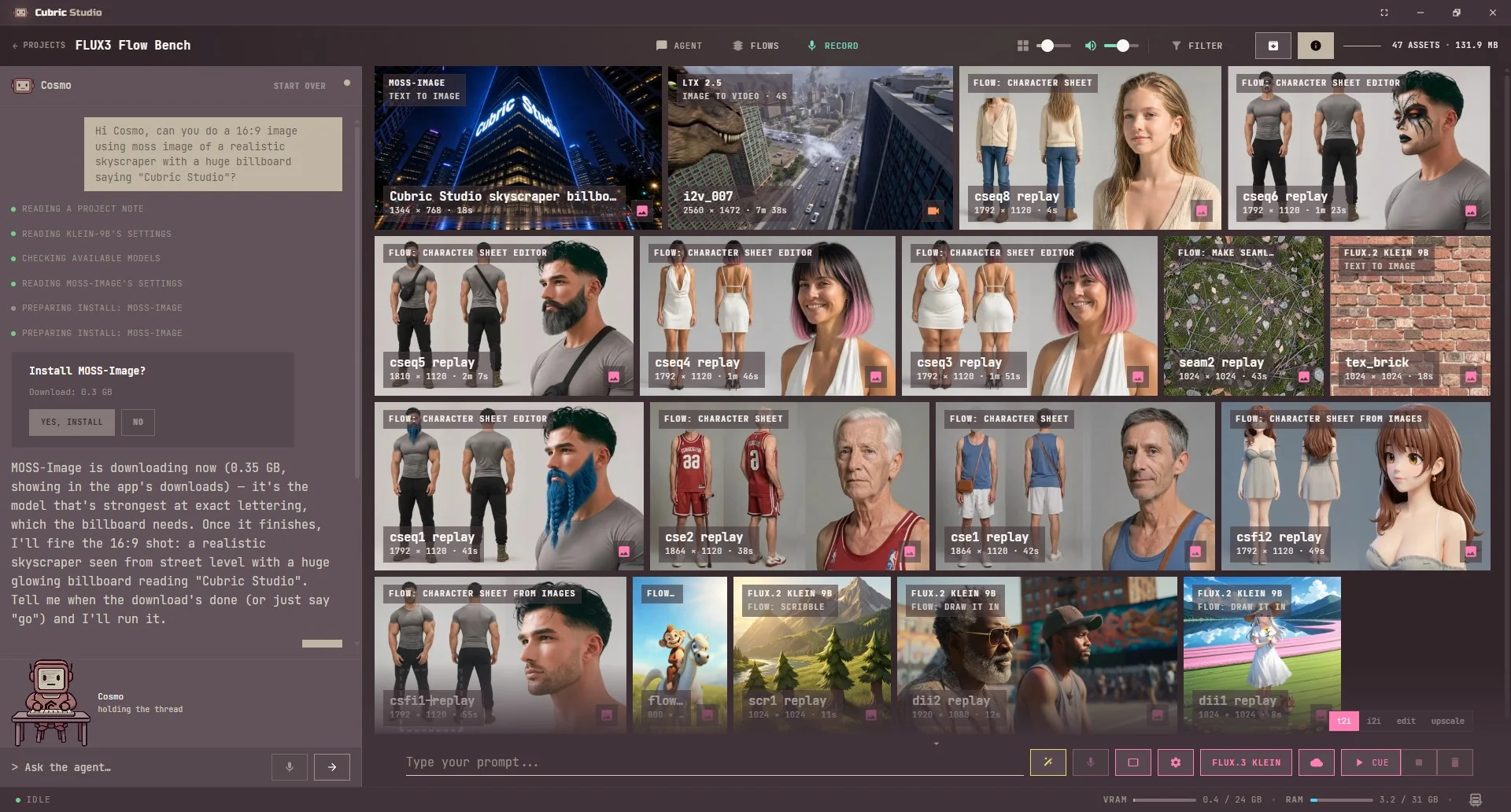
A real project: Cosmo picks the model best at lettering, shows every step, and asks before it downloads.
What an AI agent for image generation should do
A prompt box with a chatbot bolted on is not an agent. The useful kind takes a goal ("make a character sheet of her, then three scenes, then animate the best one") and carries it out: chooses the right model for each step, runs it, checks the output and carries on. You should see every step, it should ask before it spends money, and it should not be able to wreck your project.
Cosmo, the agent inside Cubric Studio
Press Agent in any project, or A, and a chat panel opens beside your gallery. You can also start on the Projects screen: ask for "a project named Blue Lagoon with a video of a lagoon with sharks" and Cosmo creates the project, opens it and gets going. What it does on its own:
Picks and installs the model. It chooses the model or Flow for the job. If it is not on your computer yet, a Yes/No card shows the download size; nothing downloads until you press Yes.
Runs images, video, sound and whole Flows. It writes the prompt, picks the operation and the few settings that matter (each model's own settings are already tuned), and names the card, or runs a Flow such as Outpaint end to end.
Looks at what it made. On a model that can see pictures it checks the result itself (same face? colour cast? why did this miss?) before it decides what to do next.
Works from your mask. Paint the area once; it writes the edit for that area. It never paints a mask or picks the area for you.
Makes GIFs, moves cards, hears clips. It builds and trims GIFs, sends cards to another project ("take the last two to a new project"), and reads what is said in a video.
Saves routines. Do the same three steps twice and it offers to save them as a routine you can run on any cards in one go.
Under each message a line per step shows what it is doing, and a small crew of mascots shows which job is running. Hold Ctrl+Space to talk to it instead of typing.
Safe by design: it asks first, and it cannot delete
Every paid run asks, every time. Before a cloud generation it shows "Run this on <model>?" with the price on your own DeepInfra key. There is no setting that skips the question. Local models are free and never ask.
Nothing installs without a yes, and the card names the download size.
It never deletes a card, a project or your media. The one thing it deletes is a routine, when you ask.
Same safety check as you. Every prompt it writes passes the same child-safety check as one you type.
A local AI agent for image generation: what runs where
Two parts, two choices. The images and video run on your own graphics card, on open models such as Krea 2, FLUX.2 Klein, SDXL, Qwen Image Edit, Wan 2.2 and LTX 2.3, or on cloud models (Seedream, Nano Banana, Seedance, Veo) on your own DeepInfra key if you choose. The agent's language model is picked in the app's Remote panel:
Ollama, on your own computer, free, no key. It shares your video memory with the generation, and local models score well below hosted ones on the agent's own tests.
DeepInfra, the recommended one: hosted, so it costs no video memory, and the same key runs the cloud models.
OpenRouter, OpenAI or any OpenAI-compatible endpoint, on your own key.
On DeepInfra, a readout at the top of the panel shows what the chat and its paid runs have cost on your key, so a hosted agent is never a surprise bill.
A ComfyUI agent, without the nodes
Underneath, Cubric Studio drives a ComfyUI engine it installs and keeps working for you. So you get ComfyUI's open models with an agent on top, and you never open a node graph. The trade: it runs a curated, tested lineup rather than any workflow you download. If you live in custom ComfyUI graphs, an MCP server for ComfyUI is the better fit (see below).
Prefer your own agent? Use MCP
Cubric Studio also speaks MCP, so Claude Code, Claude Desktop, Codex or Google Antigravity can drive it with the same tools Cosmo uses: make images and video in a project, look at the results, run routines. Connect from Settings > Connect an agent, one click each. MCP image and video generation, explained.
Other AI image and video apps with an agent
These came up for the same question. They differ most on two things: where the generation runs, and whether the agent lives inside the app or connects from outside.
A free, open-source (AGPL-3.0) desktop app with Chat, Create, Code and Agent tabs. Its agent can use tools and run image and video generation, on a local language model (Ollama, LM Studio and others, or its own bundled engine) or on cloud keys. Generation runs through a ComfyUI it installs and manages for you. Windows, Linux, and macOS in beta.
Best for
People who want one app for local chat, coding and media, with the agent as a general assistant.
A free (GPL-3.0) video workstation with a timeline, and an MCP server its README puts at 100+ tools so an outside agent can plan shots, generate and edit. All generation needs a ComfyUI you install and run yourself, and its node graphs are part of the app. The built-in assistant is a chat panel for LM Studio.
Best for
Editors who already run ComfyUI and want an outside agent to help assemble a finished video.
A free (MIT) desktop video studio with a built-in assistant that uses the same tools as outside MCP agents, on a canvas and a timeline. Every generation and the assistant itself run through a kie.ai key, so nothing runs on your own graphics card. A young project.
Best for
Cloud video production with an assistant, if paying per generation is fine.
A free (GPL-3.0) no-node interface for models such as Krea 2, Flux, Wan, LTX and Qwen-Image, with an agent on Ollama or OpenRouter and an MCP server. It is an early alpha that you install from source and serve to a browser, aimed at Linux with Windows experimental.
Best for
Tinkerers on Linux who are comfortable installing from source.
A desktop studio for images, video, audio and 3D whose docs claim 310 MCP actions for an outside agent. Its assistant can use Ollama, but every image and video is generated in the cloud on your own Scenario account. Source-available under a noncommercial licence, not open source.
Best for
Scenario users who want an agent to drive many creative tasks.
Price
App free for noncommercial use; generations billed by Scenario
A free (MIT) studio for images and video with an Agent Studio. Local mode runs SD 1.5, SDXL and Z-Image; video needs a separate Wan2GP install, and the agent and the large models run on the MuAPI cloud.
Best for
People happy to use a hosted service for the agent and the big models.
Price
Free app; cloud usage billed
Facts from each project's own GitHub page, checked 22 October 2026. Tool counts are the projects' own figures.
Plenty of tools say "MCP" without having an agent of their own: they let Claude or Codex drive them instead. That is a good thing to have, and Cubric Studio has both.
AI image generator agent: questions
Is there an AI image generator with an agent built in?
Yes. Cubric Studio is a free, open-source desktop app with an agent called Cosmo built into every project. You ask in plain words and it picks the model, offers to install it, runs the image or video, looks at the result and tells you what it made.
What is the best AI image generator agent?
For a free app that generates on your own graphics card and has the agent inside it, Cubric Studio. If you would rather drive generation from Claude, Codex or Antigravity, Cubric Studio also speaks MCP. If you already run ComfyUI and want to keep its node graphs, an MCP server for ComfyUI is the other route.
Does the agent run locally?
The images and video run on your own graphics card. The agent's language model is your choice: free on your own computer with Ollama, or a hosted model on your own DeepInfra, OpenRouter or OpenAI key. Hosted models score better on the agent's own tests and use none of your video memory.
Can the agent spend my money?
Not without asking. Before every paid cloud generation it shows the price and waits for you to press Yes, every time, with no setting that skips it. Local models are free and never ask.
Can the agent delete my work?
No. It never deletes a card, a project or your media. The only thing it deletes is a saved routine, when you ask it to.
Is there a ComfyUI agent with no nodes?
Cubric Studio runs a ComfyUI engine underneath that it installs and looks after itself, and puts an agent and a normal creative app on top. You never see or wire a node graph. It does not load your own ComfyUI workflows.
Is it free?
Yes. Cubric Studio is free and open source (AGPL), with no account and no subscription. Local models cost nothing to run. A hosted agent model or a cloud generation bills your own provider account directly; there are no Cubric credits.
Can I use what I make commercially?
Yes. Cubric Studio is free and puts no limit on what you do with what you make: it is yours. Each model comes with its own licence from the people who made it. Most allow commercial use; a few are for non-commercial use only, and some ask larger companies for a separate agreement with the model's creator. Where a model has terms you must accept, the app shows them before it downloads.