CubricStudio

Cubric Studio

The simplicity of the paid sites, free and on your own computer.

Every model we ship comes tuned by us, so you never pick CFG, steps or a sampler, and never type a resolution. Describe what you want and get a good result, then shape it with edits, masks and Flows. Run open models on your own graphics card, reach for the big cloud models on your own key, or just ask the agent built into the app.

Free and open source · Windows, macOS and Linux · No account · No analytics · Join us on Discord

  • Lingo shapes the words
  • Prism makes the images
  • Cosmo runs the crew
  • Reel puts them in motion
  • Vinyl gives them sound
Settings
Tuned for you
Makes
Images, video and sound
Runs
On your GPU, offline
Price
Free, no account

A whole studio in one window.

Five apps became one, and the crew came too. We planned a family of apps. It turned out to be one app, so it took the family name. Each of the crew now looks after one part of it, and the colour on a button or a card tells you which: pictures, video, sound and words.

One prompt box, a few settings that matter, and everything else tuned for you. Every picture, clip and sound lands as a card in your project, with its full history, so your work stays organised.

Pictures Describe it, then fix just the part you want.

Generate from a prompt, then edit by saying what should change: the rest of the picture stays as it was. Mask a face, a hand or a background and work only there, give it a reference picture, place one image inside another, and upscale the result. Big photos too: 16K images import and edit.

A dog in a red cape flying above the clouds, made by editing an ordinary photo with one sentence
Photoreal portrait of a woman with a tattooed face beside a snow leopard
Tarot-card illustration of two explorers running from a red dinosaur
A giant armoured monster walking between skyscrapers in the rain
A horned beast made of fire, in a painted fantasy style

Video Direct the motion, not just the prompt.

Generate from a prompt or a still and guide it with a first and last frame. Then carry a clip on past its last frame, sound and all, double its resolution, and trim it on its waveform.

Sound It makes sound now too.

Read text aloud in 23 languages, change a voice, write a song from your own lyrics, make sound effects and music, split a song into stems, or give a silent clip its soundtrack.

  • Text to speech
  • Voice changer
  • Songs from your lyrics
  • Sound effects and music
  • Stems
  • Foley for silent clips

Flows A whole job, one step at a time.

A Flow asks for what it needs a step at a time, installs its own models and hands you the finished result. Thirteen come with 2.0.

  • Draw It In
  • Scribble
  • Object Stamp
  • Character Sheet
  • Outpaint
  • Extend Video
  • Upscale Video
  • Add Foley
  • Voice Changer
  • Text to Speech
  • Song
  • Stems
  • Sound & Music

And the rest

  • GIFs with their own workspace: retime, trim, crop, and cut the subject out of every frame.
  • Stacks: put cards together and run one job on all of them.
  • Projects with their full history, in folders on your own disk.
  • Masks you can export to Photoshop or anything else.
  • Your own LoRAs and upscalers.

The agent

Just ask.

Press Agent, or A, and say what you want in plain words. It can work from a mask you painted, outpaint a picture, and make GIFs.

  1. Picks the right model and installs it
  2. Runs the generation or the Flow
  3. Looks at what it made
  4. Tells you
  • It asks before anything costs money.
  • Talk instead of typing: click the mic, or hold Ctrl+Space.
  • Runs on your own DeepInfra, OpenRouter or OpenAI key, or free on Ollama.
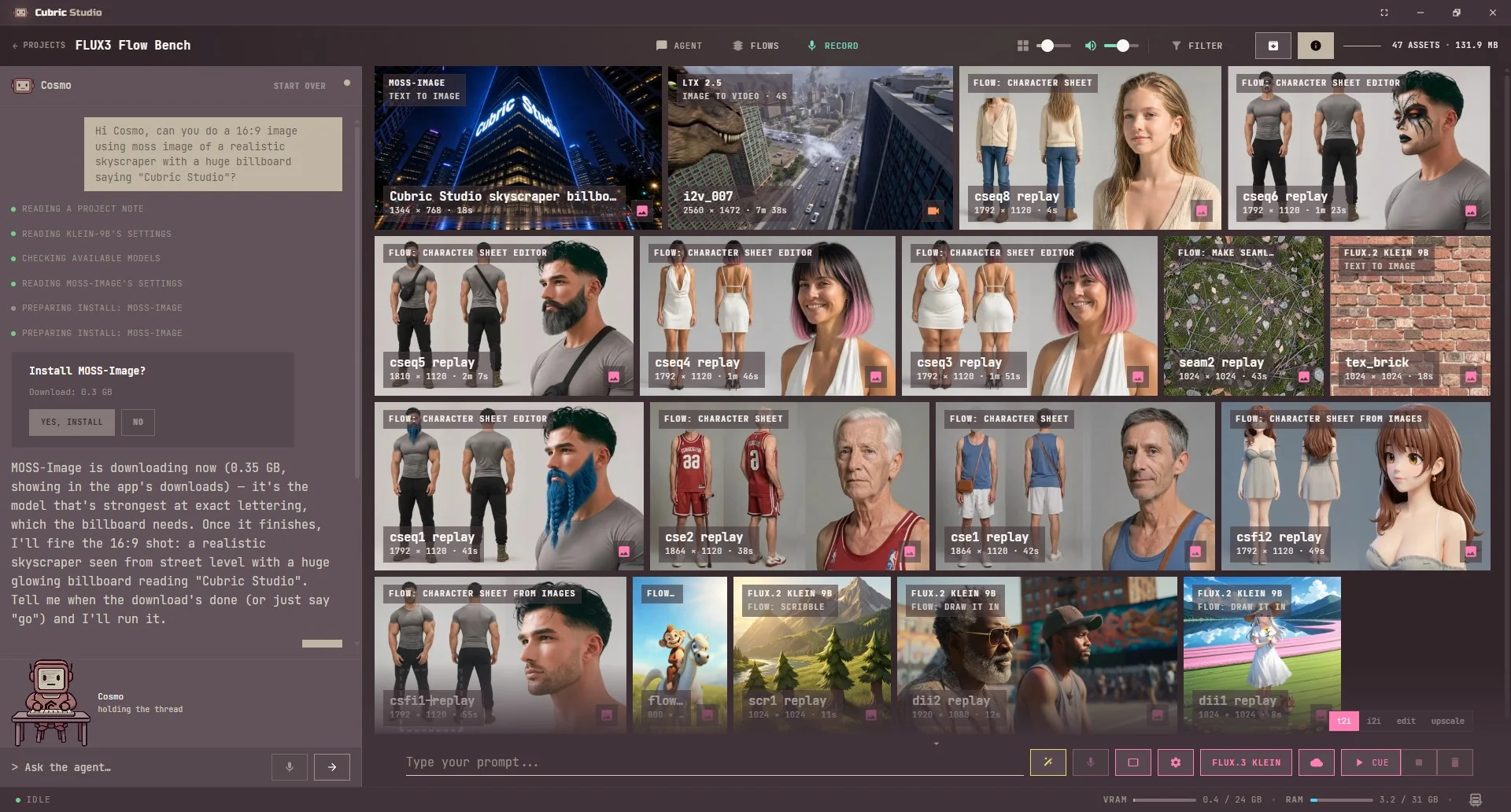
Cubric Studio with Cosmo, the built-in agent, open beside a gallery of images, video and character sheets. Asked for a 16:9 billboard image reading Cubric Studio, Cosmo picked MOSS-Image for its lettering and asks before the download.
A real project: asked for a billboard, Cosmo picked the model best at lettering, showed every step, and asked before it downloaded.

Cloud models

The big models, on your own key.

No graphics card, no download, no waiting for a model to install. Pick a cloud model and it runs on DeepInfra, billed to your own DeepInfra account. You pay DeepInfra directly for what you use: no Cubric credits, no subscription, nothing added on top.

The prompt box shows what a run costs before you press Cue.

Pictures

  • Seedream 4
  • Seedream 4.5
  • Seedream 5.0 Pro
  • FLUX.2 Klein 9B (Cloud)
  • FLUX 2 Dev
  • FLUX 2 Pro
  • FLUX 2 Max
  • Nano Banana 2 Lite
  • Nano Banana 2
  • Nano Banana Pro

Video

  • Seedance 1.5 Pro
  • Seedance 2.0
  • Wan 3.0
  • Veo 3.1 Fast
  • Veo 3.1

Rather run the open models on a bigger graphics card? Rent one on RunPod from inside the app, on your own RunPod account.

Model names belong to their makers.

MCP

Let Claude, Codex or Antigravity drive it.

Cubric Studio speaks MCP, so the AI agent you already use can work in it. Ask for "an image of a red bicycle in a new project" and it lands in your gallery as a real card, with its prompt and settings saved.

The easy way: in the app, open Settings > Connect an agent and press Connect next to yours.

Claude Desktop
Download the Claude Desktop extension

Then open Settings > Extensions in Claude Desktop and drag the file onto that page. Windows and macOS.

Claude Code
/plugin marketplace add https://github.com/MadPonyInteractive/cubric-studio-agents.git
/plugin install cubric-studio@cubric-studio
Codex
codex plugin marketplace add MadPonyInteractive/cubric-studio-agents
codex plugin add cubric-studio@cubric-studio

Use ChatGPT? Codex comes with your plan. Use Gemini? Antigravity is Google's agent app for your computer.

Paid cloud models ask first. Nothing your agent can do deletes a project, a card or a file. It reaches the app on your own computer only.

Full setup guide What your agent's provider sees

Your machine. Your files.

Models handled for you

Pick a model and the app installs it with everything it needs, tuned so you never adjust CFG, steps or samplers. The ComfyUI engine underneath is tested and version-locked, so an update does not break last month's work, and you never wire a node.

Local and private

Prompts, pictures, video and projects stay on your computer. The app goes online only when you choose something that needs it, and our privacy page lists every case.

Honest about your machine

Graphics memory, system memory, the queue and progress are always on screen, and the Model Library can show only the models your graphics card can run.

Independent

Open source, funded by the people who use it, built on open models.

Get Cubric Studio.

A portable build from GitHub. Unzip it and run it: no installer, no account.

Download for Windows Download for macOS Download for Linux

macOS 14 (Sonoma) or later on an M-series Mac (not yet tested on 2.0). Linux on x64.

All releases on GitHub Install guide Help on Discord

Community

Build it with us.

Cubric Studio is made by one person, in the open, and the Discord is where that happens. It is early days there, so what you say gets read, and often shapes the next release.

  • See it being built. Dev updates land several times a day, straight from the work.
  • Ask for what you want next. A model, a Flow, a fix: requests start here.
  • Get unstuck. Help with installing, your graphics card, or a result that looks wrong.
  • Show what you made. Pictures, video, sound, and the prompts behind them.
Join the Discord
Cubric Studio on Discord Free to join · discord.gg/WX7tDFSVmY

Keep Cubric independent.

Cubric Studio is free and open source, built by Mad Pony Interactive, a one-person studio. Your support pays for the hours behind every release. Nothing is paywalled, gated or delayed: every version ships to everyone at the same time.

Donate

Any amount, once or monthly.

With PayPal or a card. No PayPal account needed.

Donate with PayPal
Monthly on GitHub Sponsors
  • Supporter$1 / monthJoin
  • Sustainer$5 / monthJoin
  • Patron$25 / monthJoin

Every tier gets the same thing: the Supporter role on Discord. You just choose the amount.

Questions before you install.

Do I have to learn CFG, steps and samplers?

No. We tune every model we ship, so you get a short set of settings that matter, like the shape of the picture or the length of a clip, and we take care of the rest.

Is it really free?

Yes. The app is free and open source. Two things can cost money, and only if you choose them: cloud models and rented graphics cards bill your own DeepInfra or RunPod account, and the Head Swap and DramaBox Flow packages are sold on Gumroad.

Do I need a powerful graphics card?

Not for cloud models. For models on your own machine: the lighter picture models run on about 8GB of video memory with 16 to 32GB of system memory, the larger ones are happier around 12GB with 32GB, and video usually wants 12 to 16GB with 32 to 64GB.

Does it upload my work?

Not unless you pick something that needs it. A cloud model receives your prompt and any reference pictures, and a rented graphics card receives the job. Every case is on our privacy page.

Are my API keys safe?

Yes. Keys for DeepInfra, RunPod or an AI provider are stored encrypted with your operating system's secure storage, and once saved the app never shows them again, not even to an agent you connect. They stay out of your projects, logs and bug reports, and each key only goes to the service it belongs to, never to us.

Do I need the internet after installing?

Not for models on your own machine.

Can I sell what I make?

The app puts no limit on it. Each model comes with its own licence from the people who made it: a gated model shows you its licence before it downloads, and a few are for non-commercial use only.

Which systems does it run on?

Windows (64-bit), macOS 14 or later on Apple silicon (not yet tested on 2.0), and Linux on x64.

I use Cubric Vision. What changes?

Cubric Vision is now Cubric Studio. Your projects folder is renamed for you, so there is nothing to do. On Windows, re-pin your shortcut to CubricStudio.exe.

Can I use my own models?

Cubric Studio runs a curated lineup, tuned to give good results without fiddling. You can add your own LoRAs and upscalers.

Where are my projects stored?

In your Documents folder, unless you choose another place. Each project keeps its pictures, videos and settings together.

Can I move a project to another computer?

Yes. Drag the project folder onto the Projects page. To repeat the same generations there, install the same models.

Can I roll back if an update breaks something?

Yes. Install a previous release. Your models can live in their own folder, so you do not download them again.

How do I report a bug or ask for a model?

When something goes wrong, the app usually offers to send a report to GitHub; please use it. For models and workflows, ask on Discord.

Can I build my own commercial app from the code?

No. Code from the Cubric repositories must stay in open-source apps, under the project licence.